


AnimeKai : Watch Anime LS
4.28.00 Reviews
App Specs
- Version
- 1.3.0
- Updated On
- License
- Free
- Downloads
- 10,000+
- Developer
- Digy Mana
- Categories
- Comics
- Platform
- Android
Screenshots
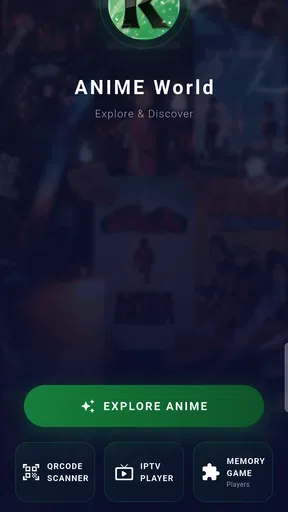

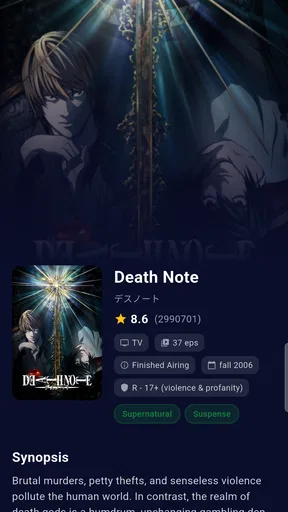
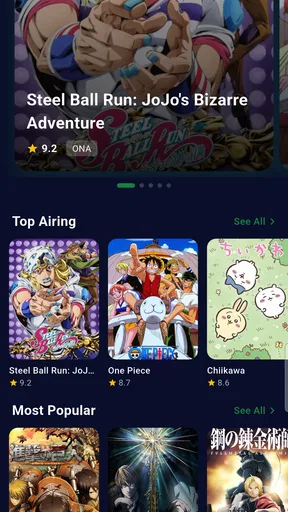
 Analysis by AppCompare
I approach AnimeKai: Watch Anime LS with one practical question: does it make choosing and watching anime feel easier, or does it ask me to trust more than I can comfortably assess? Its focus is clearly anime discovery, but trust matters too, especially when an entertainment app may involve viewing habits, accounts, or personal choices. I would look at the prompts and controls shown on my own device rather than assume anything about how information is handled.
Start with what the app makes clear
AnimeKai is a free comics-category app from Digy Mana. It has a 4.7 average from over 400 ratings and more than 10,000 installs, which suggests that plenty of people have tried it, though those figures alone cannot tell me whether it suits my needs. Its Everyone age rating is useful context for families, but I would still check the content of individual shows before handing a device to a younger viewer.
The app is listed at version 1.3.0 and works on Android 7.0 or later. That makes it a possible option for someone using an older Android phone, although I would not treat compatibility as a promise that playback will be equally smooth on every device. I would also confirm that I am installing the intended app, rather than a similarly named result, before proceeding.
Look at choices as they appear
When I try any viewing app, I pay attention to what it asks for during setup. A permission request should make sense for the action I am taking; for example, access to a device feature deserves a clear reason. I would pause rather than grant a request automatically, and revisit the phone’s app-permission settings if I later want to change a choice.
That is a useful habit with AnimeKai because the decision to watch a show is separate from the decision to share device access or create an account. I would read each prompt on screen and avoid entering personal details that are not needed for the task in front of me. I cannot infer a privacy policy or data practice from the app’s name or its anime focus, so the sensible approach is to judge the choices actually presented.
Be thoughtful about viewing habits
Anime viewing can reveal personal tastes and routines, even when a person is only trying to find a series for a commute or a quiet evening. I would be mindful about using shared devices, keeping any account details private, and checking whether the app remains signed in when other people can use the phone. These are small steps, but they give me more control over who can see my activity.
If I were helping a family member set it up, I would check the age rating and then consider the specific titles they want to watch. A broad app rating is not a substitute for deciding whether a particular story is suitable. I would also let the viewer make their own choices where appropriate, rather than treating recommendations or a popular title as an automatic endorsement.
Worth Reading Before You Choose

Flipboard Shows What News Apps Must Do Beyond the Feed

Switching to Android Auto Means Rethinking Your Driving Routine

Google Calendar Makes a Crowded Week Easier to Manage

Ludo King Makes the Most of the Minutes Between Plans

Baby Panda World Brings Quick Play to Modern Phones, but Its Game Library Feels Busy

ESPN’s Live Game View Makes Following Close Games Easier
My cautious verdict
I see AnimeKai as an app worth considering if its anime-discovery focus appeals to you and the choices it presents feel comfortable on your device. Its rating and install figures offer some reassurance that it has an audience, but they are not a guarantee of quality, privacy, or an ideal fit. I would start with a quick review of permissions and account prompts, then decide whether its actual experience earns a place on my phone.
For someone who wants a straightforward way to explore anime, that cautious trial may be enough. If you need clearly documented privacy controls before using a viewing app, or if a specific permission request feels unrelated to what you are doing, I would hold off and choose an alternative whose terms and settings you can assess with confidence.
Getting Started with AnimeKai
First things first, downloading and setting up AnimeKai: Watch Anime LS is a breeze. Available for both Android and iOS, the app is designed to be user-friendly, so you won’t need to jump through hoops to get started. Once you've got it installed, it's all about exploring the vast library of anime titles at your fingertips.
One of the first things you'll notice about the app is its sleek and intuitive interface. Everything is organized neatly, making it easy to navigate through different categories and genres. Whether you're into action-packed adventures or heartwarming romances, finding something that suits your taste is just a tap away.
A Dive into the Library
The real magic of AnimeKai lies in its extensive collection of shows. The app boasts a wide range of titles, from timeless classics to the latest releases. It's like having a personal library of anime that you can carry around in your pocket. And the best part? New episodes are regularly updated, so you'll never miss out on the latest happenings in your favorite series.
What truly sets AnimeKai apart is its subtitle support. For those of us who love watching anime in its original language, the app provides high-quality subtitles in multiple languages. This feature ensures that language barriers won't stop you from enjoying the intricate storytelling and rich cultural nuances that anime is known for.
Features That Stand Out
Now, let's talk about some of the standout features that make AnimeKai a top choice for anime enthusiasts:
- Offline Viewing: Heading on a trip with no internet? No worries! AnimeKai allows you to download episodes for offline viewing, so you can enjoy your favorite shows anytime, anywhere.
- Custom Playlists: Create and manage your own playlists to keep track of what you've watched or plan to watch next. It's a great way to organize your viewing schedule.
- Recommendations: Not sure what to watch next? AnimeKai's recommendation engine suggests shows based on your viewing history, ensuring you'll always have something new to discover.
Use it around your real routine
These features are most useful when they solve a specific problem, not simply because they appear in a feature list. For a commute, I would choose an episode while connected to a reliable network and use offline viewing only if the download is available and completes before leaving. That avoids discovering on a train or in a waiting room that a connection is too weak for streaming. I would also check available device storage before saving several episodes; downloads are convenient, but they compete with photos and other apps for space.
Playlists can do more than collect favorites. I would make one for a series I have started and another for titles I am considering, so I do not confuse a future watch with an episode I have already seen. If I share a device, that separation can also help keep my plans clear for the next person. Recommendations based on viewing history are handy when I want something similar, but I would treat them as a starting point rather than a complete picture of my taste. To avoid getting stuck in one genre, I would deliberately search for a different mood or style now and then.
Where it fits among anime options
Compared with browsing a general video platform, an anime-focused app can make discovery feel more direct: I can spend less time sorting through unrelated material and more time deciding what kind of series I want. A broad streaming service may still be the better choice if I already use it for films and television, or if I want one subscription and viewing history for several kinds of entertainment. A dedicated app earns its place when its anime organization and discovery tools are useful enough to justify another app on my home screen.
I would not assume that an extensive collection means every particular title is available whenever I want it. If I am following a specific series, I would search for it before building a routine around the app. The same goes for language: subtitle support is valuable, but I would check the options for the particular episode and language I need rather than assume every title offers identical choices.
My Personal Experience
Having spent some quality time with the app, I can honestly say that AnimeKai has enhanced my anime-watching experience. The app is stable and responsive, with minimal buffering, even during peak usage times. The video quality is top-notch, providing a smooth and immersive viewing experience.
One of my favorite things about AnimeKai is the community feel. The app features a comments section where users can discuss episodes, share theories, and connect with fellow anime lovers. It adds a social dimension to the app, making it more than just a streaming service.
Who I would recommend it to
I would suggest giving it a try to someone who likes browsing anime by genre, keeps a watchlist, and enjoys discovering shows through recommendations. It also suits a viewer who wants the option of offline episodes for planned stretches without a dependable connection. If you mainly watch one known series, though, a service you already use may be simpler than installing another app just for that title.
The comments feature can make the experience feel less solitary, but it is not essential to enjoying a show. I would use it after watching an episode rather than before, especially when I want to avoid spoilers. A practical habit is to finish the episode first, then open discussion; that preserves the fun of a reveal and gives me a chance to form my own opinion before reading other viewers’ theories.
For an everyday example, imagine choosing something for a short evening break. I would use the genre categories to narrow the mood, save a promising series to a playlist, and use the recommendation suggestions only if nothing catches my eye. If I plan to watch during tomorrow’s commute, I would prepare a download at home and verify that it is available before relying on it. This small routine makes the app’s discovery, organization, and offline options work together without turning casual viewing into a chore.
Limits worth keeping in mind
The biggest practical trade-off is that discovery tools are only as helpful as the selection and organization you encounter in daily use. A large library can still feel overwhelming, and recommendations shaped by viewing history may keep pointing toward familiar genres. I would use search and categories actively rather than expecting the app to pick the perfect next show every time. Likewise, subtitles make original-language viewing more accessible, but reading them while watching on a small screen may not suit every setting.
Offline viewing is useful for travel, but it requires a little planning and available storage; it is not the same as having every episode ready automatically. Comments add conversation, but they can also expose a viewer to spoilers or opinions that affect how a show lands. If you prefer a quiet, uninterrupted watch, simply ignoring that social layer may be the better way to use the app.
Final Thoughts
All in all, AnimeKai: Watch Anime LS is a solid choice for anyone looking to dive into the anime world. Its impressive library, user-friendly interface, and additional features like offline viewing and custom playlists make it a versatile and enjoyable app. While no app is perfect, AnimeKai comes pretty close, offering a comprehensive and engaging experience for anime fans everywhere.
Whether you're a seasoned anime aficionado or a curious newcomer, AnimeKai has something for everyone. So go ahead, give it a try, and let the anime adventures begin!
Pros
- Extensive anime library available.
- High-quality streaming options.
- User-friendly interface design.
- Regular updates with new content.
- Offline viewing mode available.
Cons
- Contains in-app advertisements.
- Subscription required for full access.
- Limited subtitle options for some titles.
- No parental controls available.
- Requires stable internet for HD streams.
FAQs for AnimeKai : Watch Anime LS
What is AnimeKai: Watch Anime LS, and how does it work?
AnimeKai: Watch Anime LS is a mobile application that allows users to stream a vast library of anime shows and movies. It provides both dubbed and subtitled versions, catering to a wide range of preferences. The app offers high-quality streaming with various resolution options, making it a preferred choice for anime enthusiasts.
Is AnimeKai: Watch Anime LS free to use, or does it require a subscription?
AnimeKai: Watch Anime LS offers both free and premium subscription options. The free version includes ads and limited access to content, while the premium subscription, which requires a monthly fee, provides an ad-free experience with full access to the entire anime library and additional features such as offline viewing.
What are the device compatibility requirements for AnimeKai: Watch Anime LS?
AnimeKai: Watch Anime LS is compatible with both Android and iOS devices. It requires Android version 5.0 or higher and iOS version 11.0 or later. Users should ensure their devices meet these requirements to enjoy a smooth streaming experience without compatibility issues.
How frequently is new content added to AnimeKai: Watch Anime LS?
AnimeKai: Watch Anime LS regularly updates its library with new anime releases and popular series. The app ensures that users have access to the latest episodes shortly after their official release in Japan. This frequent update schedule keeps the content fresh and engaging for its audience.
Are there any parental controls available in AnimeKai: Watch Anime LS?
Yes, AnimeKai: Watch Anime LS includes parental control features that allow parents to restrict access to mature content. This feature ensures a safer viewing environment for younger audiences by enabling parents to set up age-appropriate content filters and monitor viewing habits within the app.


